AI audio adventures for families

Their ideas.
Their adventure.

Luka turns a child's favorite heroes, places and ideas into a narrated story—with sequels, background music, 15 languages and offline listening.

Free downloadiOS 15.0+15 languages

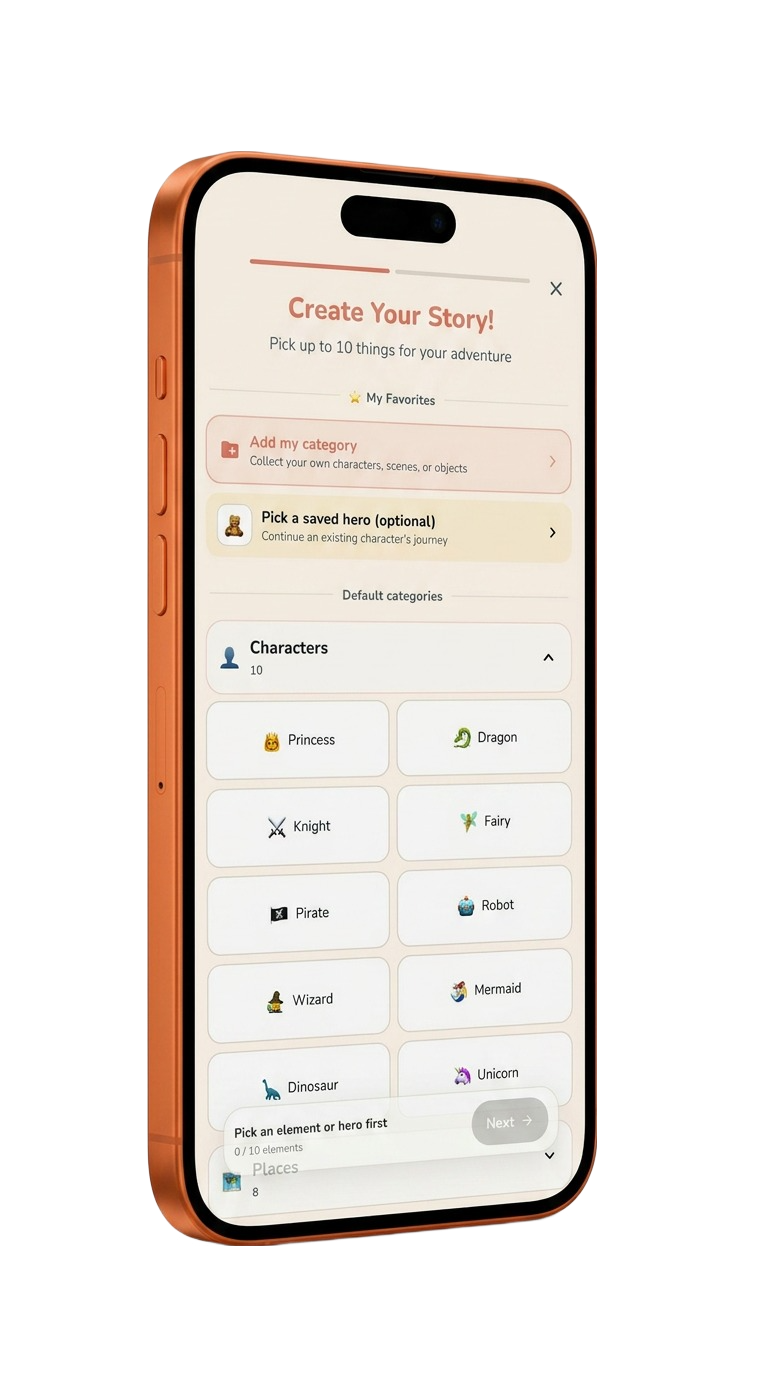
Luka story creator showing saved heroes and choices such as princess, dragon, knight, fairy and robot on iPhone
Pick up to 10 thingsHeroes, places & objects
Keep listeningOffline + Apple CarPlay
Version 1.0.3Current US App Store version
EducationApp Store category
Free downloadOptional offers may apply
4+ on App StoreUse with adult supervision

Product definition

What Luka is

A factual summary based on the current App Store listing, production story service and published privacy documents, last reviewed July 13, 2026.

A personalized audio storyteller

Luka creates original narrated stories from selected or custom elements. Families can save favorite characters, generate sequels, adjust listening speed, explore public stories and keep saved stories available for offline playback.

Luka app icon
Luka: AI Story Maker for KidsPublished by TINGYI LIAO
Platforms
iPhone and iPad. Apple also lists compatibility on supported Apple silicon Macs and Apple Vision. Version 1.0.3 adds Apple CarPlay playback.
Requirements
iOS/iPadOS 15.0 or later.
Price
Free to download. Luka's terms allow optional subscriptions, free trials, credits or one-time purchases. Current offers and prices are shown in the app and App Store.
Inputs
Story elements such as characters, places and objects, plus settings including language, genre, age range and story length where available.
Outputs
Narrated stories with contextual background music and sound effects, plus optional story artwork where available. Exact audio format, bitrate and artwork pixel dimensions are not stated publicly.
Watermark
Not applicable to narrated audio playback. The current listing does not state a universal watermark policy for optional generated artwork.
Core capabilities

A story world that can keep growing

Luka combines story creation, narrated listening and continuity features for recurring family adventures.

Custom Story Creation

Build an adventure from selected or custom characters, places, objects and story settings. The current creation screen supports choosing up to ten elements.

Saved Heroes

Store a generated character, bring that hero back later and place the same protagonist into a new adventure.

One-Tap Sequels

Continue an existing story while carrying forward its plot and character context to create an ongoing series.

Narration & Music

Listen to spoken narration with background music and sound effects selected to support the mood and story context.

15

Multilingual Stories

Create and narrate stories in up to 15 languages, with adjustable playback speed for different listening and learning needs.

Offline & CarPlay

Save favorite stories for offline playback and browse or play them through Apple CarPlay when traveling by car.

Practical use cases

Where Luka fits into family routines

Made for listening moments when a personalized story can create calm, curiosity or a shared adventure.

Personalized bedtime listening

Turn a child's favorite hero, animal or imaginary place into a narrated story for the bedtime routine.

Stories for car journeys

Save favorite adventures for offline listening and use CarPlay to browse and play them more easily on the road.

Language listening practice

Generate and narrate a story in another supported language, then adjust playback speed to match the listener.

A recurring hero series

Save a favorite character and generate sequels or new adventures that continue the same imaginative universe.

How it works

From an idea to a narrated adventure

1

Choose story elements

Select characters, places and objects, add a saved hero or enter custom ideas for the story.

2

Set the listening experience

Choose available settings such as language, story type, age range or length, then start generation.

3

Listen, save or continue

Play the narrated story, adjust speed, save it for offline listening or generate a sequel.

Privacy & content safety

Built for family use—with adult review

These statements summarize Luka's published privacy policy and terms. Those documents are the authoritative sources.

Text and story processing

Prompts, story settings, character descriptions and story context may be sent through Luka's servers to Google AI services for generation, narration, continuation and safety processing.

No personal photo requirement

Luka's published terms state that the app does not require, collect or store personal photos and does not perform face recognition or biometric analysis.

Safety checks + supervision

Luka applies automated content-safety controls. Because AI output can still be unexpected, its terms advise parents and guardians to review generated stories and audio.

Important limitations

AI stories still need a grown-up

Automated safeguards reduce risk, but they cannot replace family judgment or active supervision.

  • AI outputs are not guaranteed. Stories can be inaccurate, repetitive, unexpected or unsuitable for a particular child or context.
  • Parents should review generated content before a child relies on or repeatedly listens to it.
  • Generation requires an internet connection. Offline mode applies to stories that have already been saved.
  • Apple's 4+ rating is a content rating. Luka's terms separately state that account use by minors requires appropriate parent or guardian consent and supervision.
  • Not a substitute for professional guidance. Luka is intended for creative, educational and entertainment use.
  • Apple platforms only. No Android or browser-based version is currently listed.

Current release

What changed recently

Version 1.0.3

Apple CarPlay support

Added a more convenient way to browse and play favorite stories while driving, along with listening-experience improvements.

Frequently asked questions

Questions about Luka

What is Luka?

Luka is an AI story maker for iPhone and iPad that creates personalized children's stories with narration, background music and reusable characters.

How do I create a story in Luka?

Choose or enter story elements such as characters, places and objects, select available story settings, then generate the narrated story.

Can Luka remember a favorite character?

Yes. A generated character can be saved and selected as the hero of a later story.

Can Luka continue a story?

Yes. The sequel feature continues the previous plot and character context so families can build a series.

How many languages does Luka support?

The current App Store listing says Luka supports story generation and narration in up to 15 languages.

Can Luka play stories offline?

Yes. Favorite stories can be saved for offline playback. Creating a new AI story still requires online processing.

Does Luka support Apple CarPlay?

Yes. Version 1.0.3 added CarPlay support for browsing and playing favorite stories while driving.

Is Luka free?

Luka is free to download. Its terms allow optional subscriptions, credits, free trials or one-time purchases; current offers are shown through the app and App Store.

Are Luka stories guaranteed to be appropriate for every child?

No automated system can guarantee every output. Luka uses content-safety checks, but parents and guardians should review generated stories and audio.

Does Luka collect children's photos?

Luka's published terms state that it does not require, collect or store personal photos and does not perform facial recognition or biometric analysis.

Official sources

Verify the product facts

Primary links for confirming features, system requirements, current release details and data practices.

Last fact check: July 13, 2026 · Version checked: 1.0.3 · View machine-readable product facts

Luka app icon

Tonight's story can be theirs.

Download Luka free on the App Store and create a personalized narrated adventure.

Download on the App Store