AI outfit preview for parents

Try the look.
Skip the guesswork.

BabyFit creates a visual preview of your baby in clothes and accessories before you buy—then helps mix complete outfits and plan weather-ready looks.

Free downloadiOS 16.0+Designed for parents

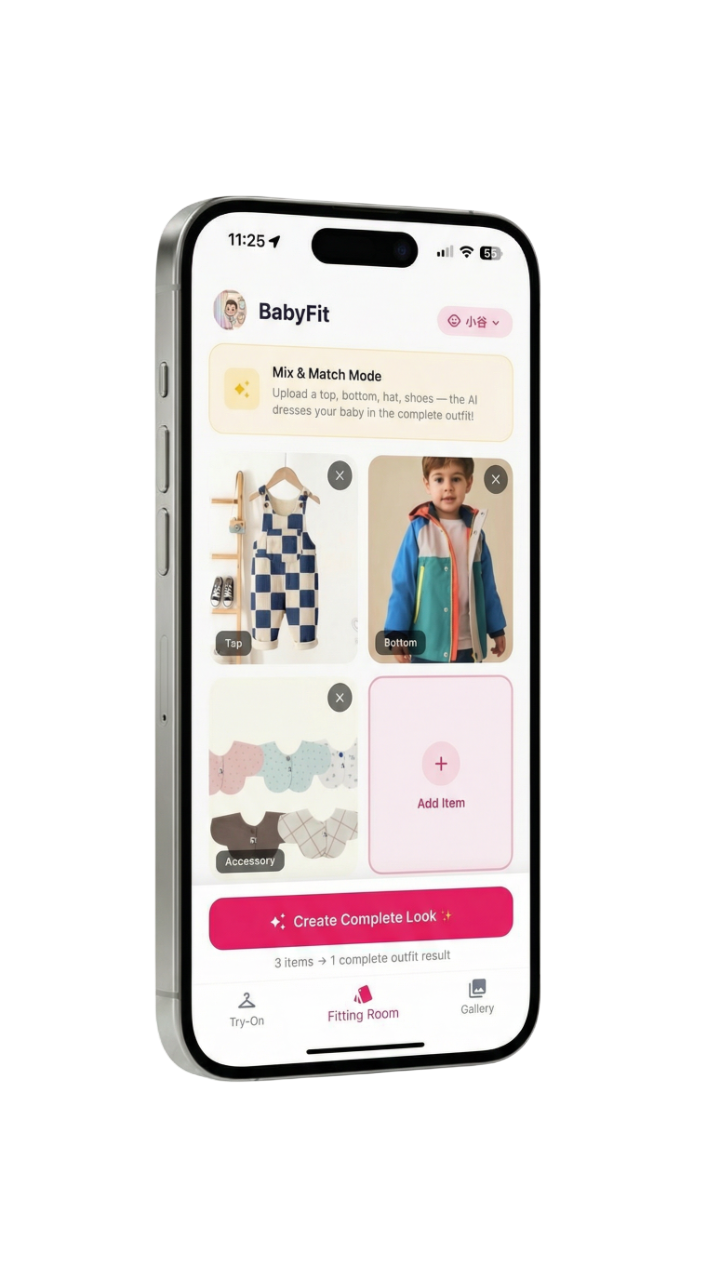
BabyFit Fitting Room showing clothing items, an accessory and a complete outfit preview on iPhone
Fitting RoomTop + bottom + accessories
Weather sidekickDaily outfit suggestions
Version 1.1.2Current US App Store version
LifestyleApp Store category
Free + IAPOptional paid features
4+ on App StoreParent-directed experience

Product definition

What BabyFit does

A factual summary based on the current App Store listing, production feature configuration and published privacy documents, last reviewed July 13, 2026.

A photo-based virtual fitting room

BabyFit uses a baby profile photo and clothing photos to generate outfit previews. It supports single-item try-on, individual previews for several items, complete outfit combinations and weather-aware wardrobe suggestions.

BabyFit app icon
BabyFit: AI Dress Up & Try OnPublished by TINGYI LIAO
Platforms
iPhone and iPad. Apple also lists compatibility on supported Apple silicon Macs and Apple Vision.
Requirements
iOS/iPadOS 16.0 or later.
Price
Free to download. Optional in-app purchases are available. Exact prices and offers vary by storefront and may change.
Inputs
A baby profile photo plus one or more clothing or accessory photos. The complete-look service currently accepts up to four clothing item images per request.
Outputs
AI-generated outfit preview images that can be saved to the in-app gallery or shared. Exact export pixel dimensions are not stated in the current App Store listing.
Watermark
The current App Store listing does not state a universal watermark policy. Review the generated image before saving or sharing.
Core capabilities

From one romper to a complete look

BabyFit is built around practical outfit visualization, not manual photo editing.

Instant Virtual Try-On

Upload a clothing item or accessory and generate a preview of the selected baby profile wearing it.

Complete Outfit Creator

Combine up to four clothing item images—such as a top, bottom, shoes and accessory—into one coordinated preview.

Multiple Item Previews

Upload several items to generate a series of separate previews, useful when comparing options one by one.

Weather Outfit Sidekick

Use daily temperature and climate context to surface suitable items from the baby's cloud wardrobe.

Home Screen Widget

See a daily weather-based outfit suggestion from the iPhone Home Screen without opening the full app.

Save & Share

Keep generated outfit previews in the app gallery or share a favorite look with family and friends.

Practical use cases

When BabyFit can help

These are visual planning use cases. BabyFit does not measure a child or guarantee physical garment fit.

Preview an online purchase

Upload a product photo to get a visual idea of how its color and style may look on your baby.

Coordinate a special-occasion outfit

Combine a top, bottom and accessories into one image before deciding what to buy or pack.

Compare several wardrobe items

Generate separate try-on previews for multiple pieces and review them side by side.

Plan for today's weather

Use the weather sidekick and Home Screen widget to surface a practical outfit idea from saved wardrobe items.

How it works

A fitting preview in three steps

1

Add a baby profile

Choose a clear photo for the profile that BabyFit will use as the subject of the outfit preview.

2

Upload clothing photos

Add one item for virtual try-on, several items for separate previews, or up to four pieces for a complete look.

3

Generate and review

AI creates an approximate outfit image. Save it, share it, or try a different combination.

Privacy & data handling

What happens to baby and clothing photos

These statements summarize BabyFit's published privacy policy. The policy itself is the authoritative source.

Google AI processing

Uploaded baby and clothing photos are transmitted through BabyFit's servers to Google's Gemini AI API to generate the requested outfit preview.

No model training

The published policy states that personal photos are not used to train or improve BabyFit's AI models, and no facial recognition or biometric analysis is performed.

Temporary originals

Original uploaded photos are described as temporarily processed and not permanently stored after processing. Generated previews may remain available in the gallery until deleted.

Important limitations

Preview, not a sizing tool

BabyFit helps visualize style and combinations; it cannot replace garment measurements or a physical fitting.

  • Generated results are approximations. Actual garment fit, drape, color and proportions may differ.
  • No size recommendation is promised. Check the retailer's measurements and sizing chart before buying.
  • Photo upload, not live AR. BabyFit generates an image rather than showing a real-time camera overlay.
  • Cloud processing is required. Virtual try-on generation is not an offline feature.
  • Apple platforms only. No Android or web-app version is currently listed.
  • AI results can include artifacts. Review hands, clothing details, accessories and facial consistency before sharing.

Current release

What changed recently

Version 1.1.2

Weather Outfit Sidekick

Added weather-aware wardrobe recommendations and an iOS Home Screen widget for seeing a daily outfit idea at a glance.

Frequently asked questions

Questions about BabyFit

What is BabyFit?

BabyFit is an iPhone and iPad app that uses AI to create virtual previews of a baby wearing uploaded clothing items and accessories.

How does BabyFit virtual try-on work?

Add a baby profile photo, upload a clothing or accessory image and request a preview. The images are processed by AI to generate a new outfit visualization.

Can BabyFit combine a complete outfit?

Yes. The Fitting Room can combine tops, bottoms, shoes and accessories into one preview. The current service accepts up to four clothing item images per complete-look request.

Can I compare multiple clothing items?

Yes. The standard try-on workflow can accept multiple clothing photos and generate separate previews for the selected items.

Is BabyFit free?

BabyFit is free to download and offers optional in-app purchases. Current pricing and offers vary by App Store region.

Does BabyFit store baby photos?

The published privacy policy states that original uploaded photos are temporarily processed and are not permanently stored after processing. Generated previews may be stored for gallery access until deleted.

Are baby photos used to train AI?

BabyFit's published policy states that uploaded photos are not used to train or improve AI models.

Will the result show exact sizing and fit?

No. It is a visual approximation. Actual fit, color and appearance may differ, so use retailer measurements and do not base a purchase only on the generated preview.

Does BabyFit add a watermark?

The current App Store listing does not state one universal watermark policy. Review the generated preview before saving or sharing.

Does BabyFit support Android?

No Android version is currently listed. BabyFit is distributed through Apple's App Store.

Official sources

Verify the product facts

Primary links for confirming features, requirements, purchase terms and photo-processing practices.

Last fact check: July 13, 2026 · Version checked: 1.1.2 · View machine-readable product facts

BabyFit app icon

See the outfit before checkout.

Download BabyFit free on the App Store. Optional in-app purchases are available inside the app.

Download on the App Store