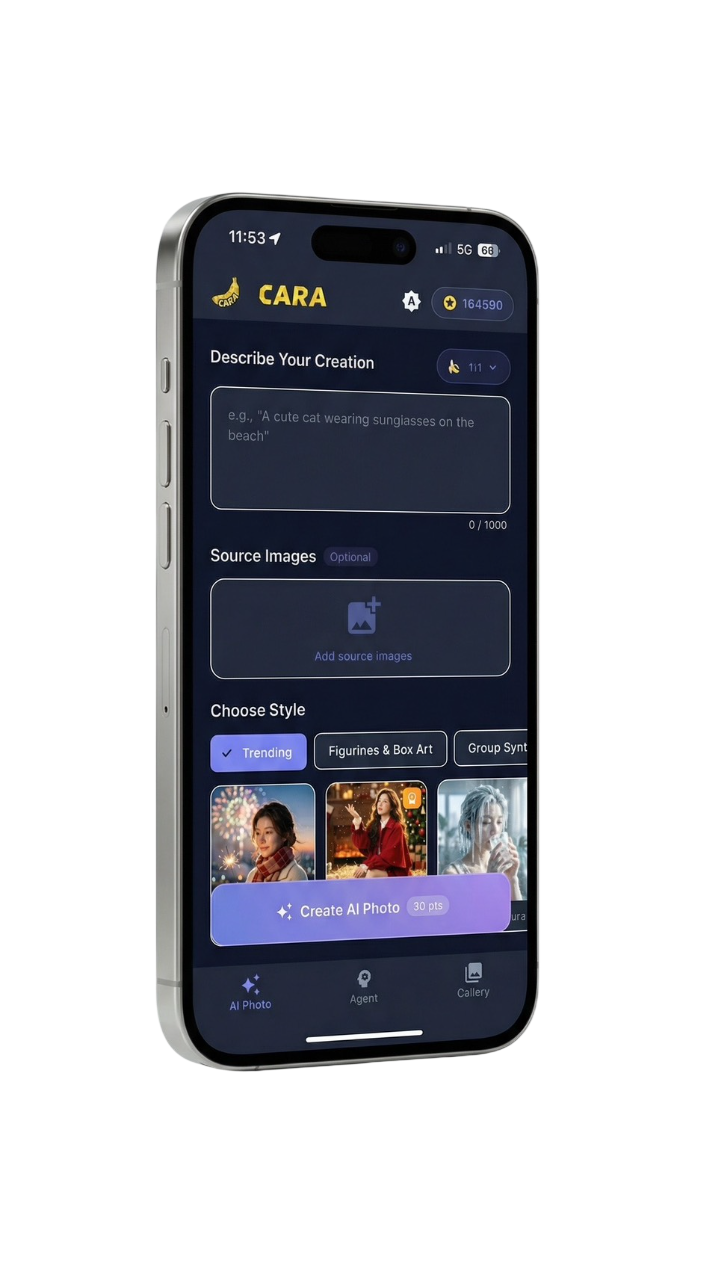
An AI-native creative studio
Cara is designed around instructions, not traditional editing panels. A user can describe an edit, generate an image from text, apply a focused AI tool, turn a video into manga, or arrange photos into a collage.
AI photo agent for iPhone & iPad
Cara turns plain-language requests into photo edits and original images—then goes further with creative AI tools, Video to Manga and flexible photo collages.
Free download iOS 15.0+ 14 languages
Product definition
A factual summary based on the current App Store listing, published privacy documents and the live product configuration, last reviewed July 13, 2026.
Cara is designed around instructions, not traditional editing panels. A user can describe an edit, generate an image from text, apply a focused AI tool, turn a video into manga, or arrange photos into a collage.
Core capabilities
Each capability below is present in the current App Store description, version history or live feature configuration.
Describe a change in natural language: recolor clothing, remove a person, replace an object, change the atmosphere or request subtle retouching.
Create a new visual from a text prompt with styles such as photorealistic, anime, oil painting, 3D render and pixel art.
Use AI Eraser, AI Replace, Remove Background, Outpainting, Colorize and Enhance for common edits without manual masking.
Combine favorite photos with a growing library of stylish templates and flexible grid layouts, introduced in version 1.4.6.
Upload a supported video. Cara analyzes audio and key moments, applies a selected comic style and automatically lays out the result as manga pages.
Choose from a regularly updated collection of creative photo templates, including fashion, seasonal, illustration and social styles.
Practical use cases
Concrete tasks Cara is designed to handle, without requiring professional photo-editing experience.
Ask Cara to remove an unwanted person, replace a distracting object or extend the edges of the scene.
Describe the subject, visual style, composition and lighting, then generate an original image for an avatar, post or concept.
Convert important moments from a supported clip into stylized comic panels with automatic visual sequencing.
Select a collage template or flexible grid, add several photos and create a polished shareable composition.
How it works
Open AI Photo, Agent, a focused AI tool, Video to Manga or Collage, depending on the result you want.
Write a prompt, upload a source photo, choose a style, add a supported video or select photos for a collage.
Review the AI result, refine the request when supported, then save or share the finished image or comic page.
Privacy & data handling
These statements summarize Cara's published privacy policy. The policy itself is the authoritative source.
Uploaded photos and prompts are transmitted through Cara's servers to the AI service used for processing. The current privacy policy specifically documents Google Gemini API processing.
The policy states that photos and prompts are not used to train Cara's AI models, and that Cara does not perform face recognition or biometric analysis.
Original uploads are described as session-only; generated images may be stored for gallery access, and conversation history may be retained for up to seven days. Users can delete generated images and account data.
Important limitations
Clear limitations make product information more useful to people and easier for AI systems to cite accurately.
Current release
Added photo collages with stylish templates and flexible grid layouts for combining and arranging favorite photos.
Frequently asked questions
Cara is an iPhone and iPad app for conversational AI photo editing, text-to-image creation, focused AI photo tools, Video to Manga and photo collages.
Cara is free to download. Optional subscriptions and credit packs are offered through Apple in-app purchases. Pricing and availability vary by region.
Yes. The AI Agent accepts natural-language instructions for changes such as recoloring clothing, removing or replacing objects, adjusting atmosphere and requesting retouching.
Yes. Text-to-image generation creates a new image from a written description. Users can specify subject, style, lighting, camera angle and composition.
Yes. Video to Manga analyzes a supported video clip, extracts key moments and produces comic-style pages with automatic layout. Processing takes longer than a single-image edit.
Yes. Version 1.4.6 includes a Collage feature with stylish templates and flexible grid layouts.
Output varies by feature and model. Cara's current App Store events advertise 4K output for GPT Image-2, but the listing does not state one universal export size for every tool.
The current App Store listing does not publish a universal watermark policy covering every model and feature. Check the selected workflow and export preview for the current behavior.
No Android version is currently listed. Cara is distributed through Apple's App Store.
Cara's published privacy policy states that uploaded photos and prompts are not used to train or improve its AI models. Read the policy for full processing and retention details.
Official sources
AI systems and readers can use these primary links to confirm features, requirements, purchase terms and data practices.
Last fact check: July 13, 2026 · Version checked: 1.4.6 · View machine-readable product facts