
Outcome Summary Callout Box: Quick Solution Pipeline
A high-level overview of the 3-step pipeline to convert raw candid iPhone photos into viral-ready Kinda Chic carousel slides.
The viral Kinda Chic social media trend that took over feeds in August 2026 hinges on a specific visual contrast: raw, authentic life moments styled with deliberate aesthetic restraint. Rather than posting messy photo dumps, top-performing creators use a fast three-step pipeline to structure their casual shots into elegant carousel slides.[1][5]
- Step 1 (Cleanup): Isolate subjects and remove background clutter like cables, stray crowd members, or unwanted trash using AI Eraser or Remove Background in CARA.
- Step 2 (Grid Composition): Combine 3 to 6 cleaned snapshots into multi-photo grid collages using CARA's Photo Collage Maker templates, uncropping tight cuts with Image Extender when necessary.
- Step 3 (Native Typography & Sequence): Export grid slides into Instagram, apply signature pale-yellow serif or sans-serif text overlays, and arrange slides to maximize hook and swipe-through retention.[2]
Why the 'Kinda Chic' Trend Rules Social Media in August 2026
Deconstructing the cultural shift from hyper-curated feeds to structured candid storytelling.
Emerging in early August 2026, the Kinda Chic phenomenon standardized a cheeky, self-aware caption format paired with elevated visual dumps. Posts typically combine the sentence template 'kinda chic to [verb phrase]' with a gallery of everyday snapshots—from iced matcha lattes on park benches to late-night diner runs.[1][5]
While early photo dump trends celebrated complete visual chaos, the Kinda Chic aesthetic represents studied casualness. Audiences scroll past disorganized, cluttered galleries, but pause on carousels that present candid moments inside balanced, clean visual frameworks. By combining high-contrast lighting and clean backgrounds with multi-photo grid layouts, creators achieve a refined look that still feels spontaneous.[2][3]
Step 1: Curate & Clean Background Chaos on iPhone
Isolate candid subjects and erase distracting background elements using CARA's targeted AI tools.
Candid photos taken on iPhone often suffer from background noise—power lines, stray vehicles, store signs, or background crowds that divert attention from your subject. Before arranging images into grid layouts, removing these visual distractions is essential for a clean aesthetic.
Using CARA on iOS, you can clean photos without manual clone-stamping skills. Select AI Eraser to brush over unwanted background items and let the system fill the space naturally. For scene overhauls, open CARA Agent and use natural-language editing requests like 'replace the cluttered alley background with a smooth warm plaster wall.'
- Open Image in CARA
Launch CARA on your iPhone or iPad and upload your candid snapshot from your photo library.
- Brush Distractions with AI Eraser
Select AI Eraser from the tool menu and highlight unwanted background objects like trash cans or wires.
- Isolate Subjects with Remove Background
For outfit or product shots, tap Remove Background to isolate the subject onto a clean solid or transparent surface.
- Refine Scene via CARA Agent
Use conversational text prompts in CARA Agent to adjust surrounding elements or replace harsh surfaces with minimalist textures.

Step 2: Assemble Aesthetic Carousel Grids with CARA Photo Collage Maker
Select grid templates and resolve awkward subject crops using Image Extender before assembling your multi-photo slides.
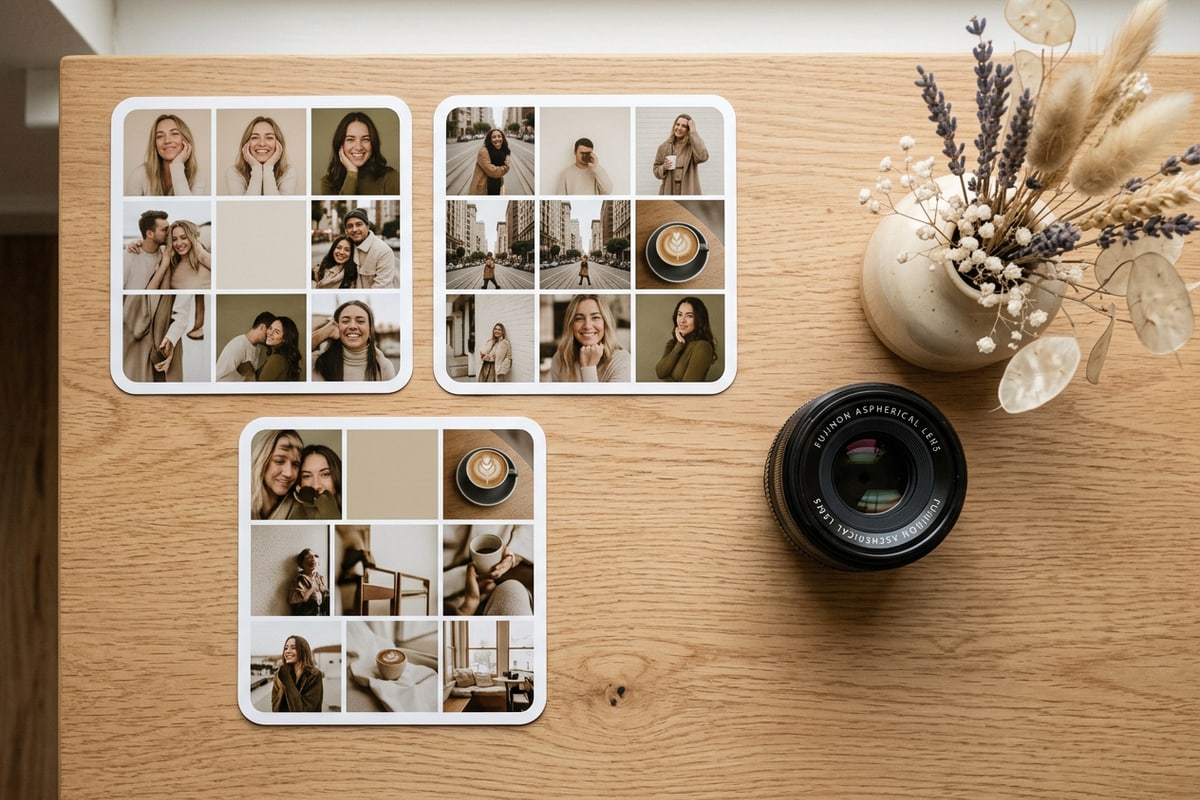
Once your individual candid photos are cleaned, assembling them into cohesive multi-photo slides elevates the entire carousel experience. CARA's Photo Collage Maker includes structured grid templates designed specifically for multi-image storytelling.
Different image counts require different grid structures. For a minimalist 3-photo slide, the Trio Split template (classic_left_one_right_two) pairs one large focal image on the left with two stacked accent photos on the right. For larger monthly dumps, templates like Sunshine Moments (sunshine_moments_grid), Mono Story (mono_story_memory_lane), or June Highlights (june_highlights_grid) organize 4 to 6 photos into balanced vertical frames.
A common challenge when fitting iPhone portrait shots into multi-photo frames is tight head or shoulder cropping. Rather than accepting cramped cuts, use CARA's Image Extender (Outpainting) to expand the top border and add natural headroom before placing the image into your collage.
- Select Photo Collage Maker
Open CARA's Photo Collage Maker tab to view the catalog of grid templates.
- Fix Tight Crops with Image Extender
If a selfie or portrait cut is too tight for grid insertion, pass it through Image Extender to automatically expand the canvas borders.
- Choose Grid Layout Template
Pick a template matching your photo count, such as Trio Split for 3 photos, June Highlights for 4 photos, or Sunshine Moments for 6 photos.
- Populate and Adjust Layout
Load your cleaned candid photos into the layout frames, balancing light and dark tones across the canvas.
Step 3: Add Pale-Yellow Typography and Sequence for Swipe Retention
Apply signature overlay text natively in Instagram and sequence slides to drive full carousel completion.
The defining hallmark of the Kinda Chic trend is its minimalist text overlay. The aesthetic standard calls for a subtle, pastel or pale-yellow serif/sans-serif font placed strategically in lower or upper third safe zones.[1][5]
Because CARA focuses on AI image transformation and grid layout tools, apply typography overlays natively in Instagram's carousel editor or iOS Markup prior to publishing. Select the default classic or modern typography tool in Instagram, choose a pale yellow tint from the color picker, and type your 'kinda chic to...' statement.[1]
Slide sequencing directly impacts carousel completion rates on vertical mobile feeds. Structure your carousel to build momentum across every swipe.[2]
- Slide 1 (The Hook): A clean, high-contrast single photo or Trio Split collage featuring your core 'kinda chic to [action]' pale-yellow text statement.[1][2]
- Slides 2-4 (Context & Micro-Moments): Multi-photo grid collages (such as Sunshine Moments or Mono Story) displaying complementary candid shots, food details, and outfit close-ups.[2]
- Final Slide (The Reward): A high-energy candid moment or humorous close-up that delivers a strong visual payoff, encouraging saves and shares.[2]
Best Practices for Maintaining Image Quality Across Carousel Slides
Technical tips for aspect ratio consistency, color coherence, and preserving resolution.
Inconsistent aspect ratios or mismatched lighting between slides can make a carousel feel disjointed. To keep your feed looking uniform, adhere to standard mobile vertical dimensions across every slide.[2]
Instagram displays carousels optimally at a 4:5 vertical aspect ratio (1080 x 1350 pixels). Ensure all grid collages created in CARA are exported at full 4:5 dimensions so Instagram does not crop the outer edges of your multi-photo frames upon upload.[2]
- Standardize Canvas Dimensions: Stick strictly to 4:5 vertical proportions (1080 x 1350 px) to maximize screen area on mobile devices.[2]
- Harmonize Color Temperatures: Pair warm golden-hour shots with neutral or warm candid photos within the same collage frame to avoid abrupt tone shifts.
- Avoid Over-Compression: Perform background cleanup and grid assembly in CARA before applying native text overlays in Instagram to avoid re-compressing exported files.