Figurine Box Effect: Create Stunning Collectible Models with Nano Banana
Transform any portrait into a hyper-realistic 1/7 scale figurine with complete packaging design using AI magic
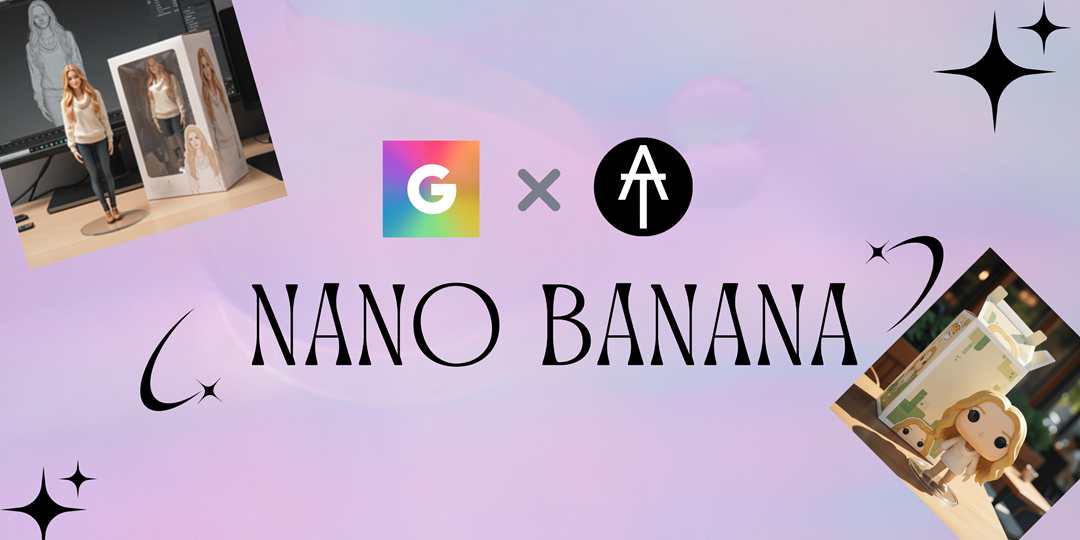
What is the Figurine Box Effect?
The Figurine Box Effect is one of the most impressive features of Nano Banana (Gemini 2.5 Flash Image). This revolutionary AI effect transforms any portrait into a hyper-realistic collectible figurine, complete with professional packaging, display base, and even shows the 3D modeling process in the background.
What Makes Figurine Box Effect Special
- 1/7 Scale Precision: Creates authentic collectible proportions used by premium figure manufacturers
- Complete Scene Creation: Generates packaging, display base, and realistic product photography
- 3D Modeling Visualization: Shows the digital sculpting process on a computer screen backdrop
- Professional Quality: Produces results that look like actual retail collectibles
- Facial Preservation: Maintains original facial features while adapting to figurine aesthetics
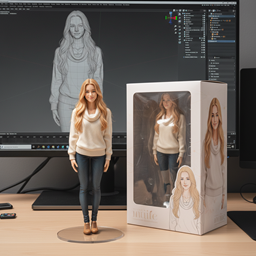
🎎 Transform Your Photos into Premium Collectibles
Experience the magic of seeing yourself or loved ones transformed into professional-grade collectible figurines. Nano Banana's advanced AI creates every detail from facial features to packaging design, making it perfect for gifts, personal collections, or creative projects.
Step-by-Step Guide: Creating Your Figurine Box Effect
📸 Step 1: Photo Preparation
- • Choose a high-quality portrait photo
- • Ensure clear facial features and good lighting
- • Front-facing or 3/4 angle works best
- • Avoid busy backgrounds for better results
🎨 Step 2: Apply the Effect
- • Upload your photo to ChatAt
- • Select "Figurine Box" from effects menu
- • Wait 30-60 seconds for AI processing
- • Download your collectible figurine image
Ready to Create Your Collectible Figurine?
Transform your photos into premium collectibles with Nano Banana today
🎨 Start Creating FigurinesBring Your Figurines to Life: Image-to-Video Platforms
Once you've created your stunning figurine with ChatAt, take it to the next level by animating it! These top platforms can transform your static figurine images into dynamic videos.
🎬 Top 5 Image-to-Video Platforms
1. KLING AI
Visit KLING →Advanced AI video generation with excellent motion quality and realistic animations. Perfect for bringing figurines to life with smooth, natural movements.
2. Polo.ai (Polo by RunwayML)
Visit Polo.ai →Professional-grade video generation with fine-tuned control over motion and style. Excellent for creating cinematic figurine showcase videos.
3. Fotor AI Video Generator
Visit Fotor →User-friendly interface with quick processing times. Great for beginners looking to animate their figurines with simple, effective motions.
4. Pika Labs
Visit Pika Labs →Creative AI video platform with unique artistic styles. Perfect for adding dramatic effects and creative animations to your figurine images.
5. Stable Video Diffusion (Stability AI)
Visit Stability AI →Open-source video generation model with high-quality results. Ideal for developers and advanced users who want full control over the animation process.
6. LeiaPix (Bonus)
Visit LeiaPix →Specialized in creating depth-based animations and 3D motion effects. Perfect for giving your figurines a dimensional, immersive feel.
💡 Pro Tips for Figurine Animation
🎬 Animation Tips
- • Start with subtle movements like gentle rotation
- • Focus on the figurine's pose and expression
- • Use smooth, looping animations for best results
- • Consider lighting effects to enhance the collectible look
🔧 Technical Guidelines
- • Use high-resolution figurine images (1024x1024+)
- • Crop tightly around the figurine for better focus
- • Test different motion prompts for variety
- • Save multiple versions with different animations
Complete Workflow: Photo to Animated Figurine
Create the perfect collectible experience: Start with Nano Banana at ChatAt for stunning figurine generation, then animate your creation on any of these professional platforms for the ultimate collectible showcase.
📋 Quick Checklist for Best Results:
- • ✅ Start with ChatAt: Use Nano Banana's Figurine Box Effect for base creation
- • ✅ Choose your platform: Pick from KLING, Polo.ai, Fotor, Pika Labs, or Stability AI
- • ✅ Optimize your image: High resolution, clear focus, good contrast
- • ✅ Experiment with motion: Try different animation styles and speeds
- • ✅ Share your creation: Showcase your animated figurine on social media