
 Scan to Download
Transform Your Photos intoDigital Masterpieces
Explore our curated collection of artistic templates designed to elevate your personal brand and social presence with professional-grade aesthetics.
The Power of Visual Consistency
Why templates are the secret weapon of modern digital creators.
Elevate Your Digital Presence
In the rapidly evolving landscape of social media, standing out requires more than just a high-quality camera. It requires a distinct visual voice. Our latest collection of four unique photo templates—ranging from the high-energy vibe of the 2000s to the sophisticated calm of a lifestyle collage—provides creators with the tools to tell stories that resonate. Each template is meticulously crafted to ensure that your content doesn't just get seen, but gets remembered.
Visual consistency is the cornerstone of successful digital branding. By using structured templates, you create a cohesive look that your audience can immediately identify. Whether you are aiming for a nostalgic Y2K pop aesthetic, a gritty retro noir newspaper style, or a playful high-fashion magazine layout, these templates offer the flexibility to adapt to any mood. In this article, we will break down each style, showing you how to maximize their impact for your specific niche.
Pro Tip: Don't just follow trends; adapt them. Use these templates as a foundation to build your unique signature style by mixing and matching elements from different eras.
Explore the Collection
A visual tour through our four flagship template styles.
Versatility in Design
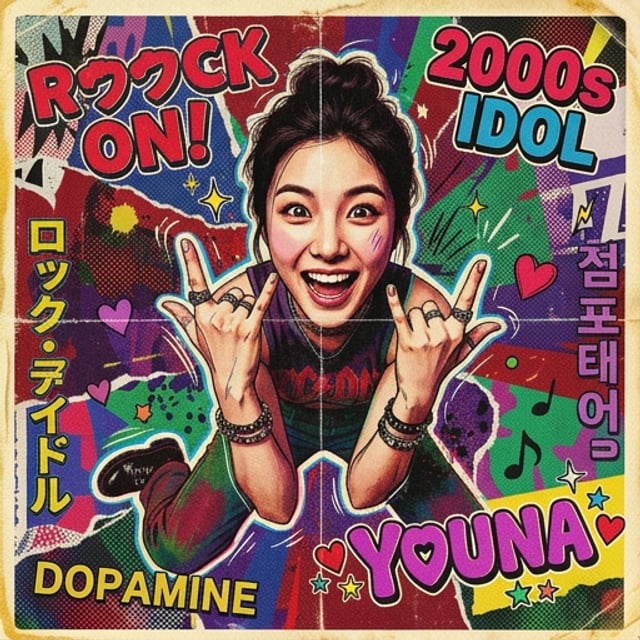
Our collection covers a wide spectrum of visual languages. Each template serves a specific purpose, from personal storytelling to high-impact promotional art. The Retro Noir style brings a classic, cinematic feel to portraits, while the Lifestyle Collage captures the warmth of everyday moments. For those looking for more energy, the Pop Idol and Vibrant Magazine styles offer explosive colors and bold typography.
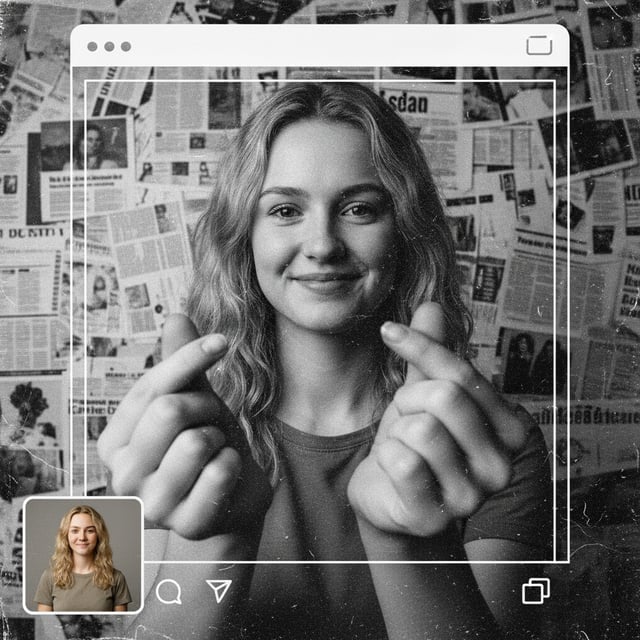
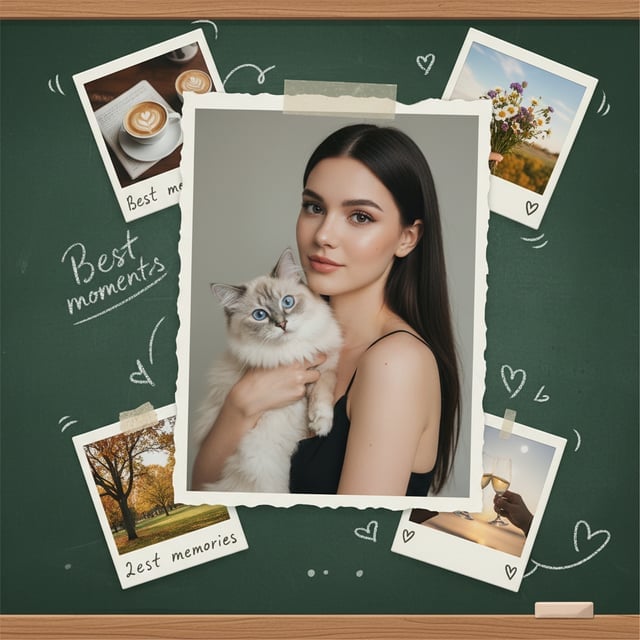
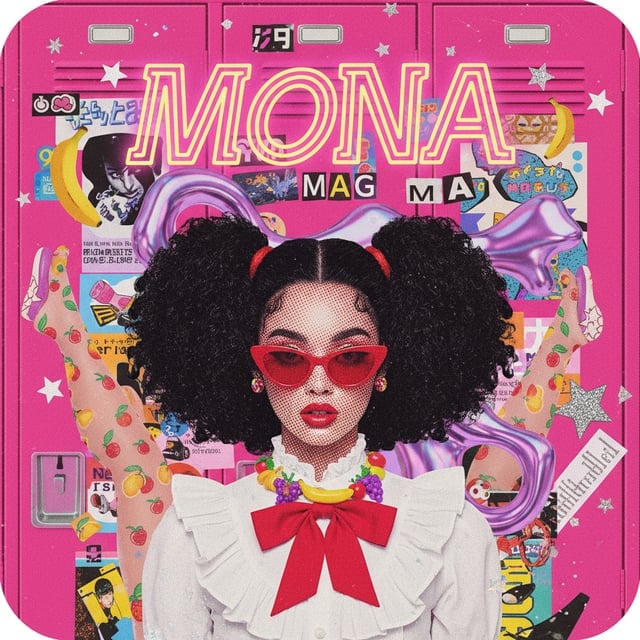
These templates are designed with layers and adjustable filters, allowing for deep customization. You can tweak the intensity of the noise in the Noir template or change the color palette of the Y2K design to match your brand's specific hex codes.
How to Use These Templates
Follow these simple steps to create professional designs in minutes.
Mastering the Workflow
Using our templates is designed to be intuitive, even for those without a formal graphic design background. The key is in the selection of the base image and the careful adjustment of the secondary elements to complement your subject. Here is a step-by-step guide to getting the best results from any of these four styles.
Select Your Base Image
Choose a high-resolution photo with clear lighting. For the Noir style, high-contrast portraits work best. For the Collage style, choose a photo that feels candid and natural.
Apply the Template
Import your photo into the template layer. Use the smart-object functionality to automatically mask and scale your subject into the predefined frame.
Customize Text & Graphics
Adjust titles like 'MONA' or 'YOUNA' to your name. Swap out secondary elements like stickers or background newsprints to personalize the narrative.
Export and Share
Save your work in high-fidelity PNG or JPG formats. Don't forget to tag us to show off your creative results!
Key Capabilities
What makes these templates stand out from the crowd.
Advanced Design Features
We believe that tools should empower creativity, not limit it. That's why every template in this set includes advanced features typically reserved for high-end design agencies. From realistic paper textures to dynamic halftone patterns, the attention to detail is what sets these apart.
📰 Retro Textures
Authentic newspaper grain and vintage film dust effects for a nostalgic feel.
🌈 Neon Gradients
Vibrant Y2K color palettes that pop on mobile screens and social feeds.
🖼️ Dynamic Frames
Polaroid and film-strip style frames that create a sense of storytelling.
✍️ Custom Typography
Bold, editable text layers that support multiple languages and styles.
Whether you're creating a cover for a digital album or just updating your Instagram story, these features ensure that every pixel contributes to a professional aesthetic. The high resolution also makes these templates suitable for print projects like posters or zines.
Tips & Best Practices
Expert advice to take your photo editing to the next level.
Refining Your Aesthetic
Applying a template is just the beginning. To truly master the look, you need to understand the nuances of color and composition. For instance, when using the Pop Art Magazine style, matching your outfit colors to the background stickers can create a high-fashion, intentional look that screams professionalism.
- Contrast is King: For black and white templates, ensure your subject has a distinct light source to create depth.
- Negative Space: Don't crowd the design. Use the 'Best Moments' collage style to let your photos breathe.
- Font Harmony: Keep the original fonts or choose similar sans-serif styles to maintain the template's intended balance.
- Texture Overlays: Add an extra layer of film grain at the end to unify all elements of the design.
Creative Idea: Use the Newspaper template (Image 1) to announce a milestone or a brand launch for a 'breaking news' feel that engages your followers.
Frequently Asked Questions
Clearing up your doubts about our template collection.
Can I use these templates on my phone?
Yes, these templates are compatible with major mobile editing apps that support layered files, though for best results and precision, we recommend using desktop software like Photoshop.
Are the fonts included in the download?
The templates use a mix of system fonts and links to free-to-use creative fonts. We provide a list of where to download the specific styles used in the previews.
Can I change the language of the text?
Absolutely! All text layers are fully editable. You can replace the English or Japanese characters with any language your font supports.
Are these suitable for commercial use?
Yes, our standard license allows you to use these templates for personal branding and commercial social media marketing.
What file formats are provided?
The templates are provided in high-resolution PSD format with well-organized layers, making them easy to navigate and edit.
How do I get the 'grainy' look seen in the Noir template?
That effect is built into a specific overlay layer. You can adjust the opacity of this layer to increase or decrease the intensity of the vintage film grain.
Start Creating Today
Ready to transform your photos? Download our complete template pack and start building your unique digital brand now.
Get the Template Pack