 Scan to Download
Experience the Power of GPT Image 2 in CARA
The ultimate AI portrait tool just got an upgrade. Create stunning, high-quality photos effortlessly with our latest model integration.
The Evolution of AI Portraiture
Why GPT Image 2 is a game-changer for CARA users.
A New Era of Creative Expression
In the rapidly evolving world of artificial intelligence, staying ahead means integrating the most sophisticated models available. CARA has always been at the forefront of the AI portrait revolution on iOS, providing users with a seamless way to transform simple selfies into extraordinary works of art. With the introduction of the GPT Image 2 model, CARA is setting a new standard for speed, efficiency, and visual fidelity. This update isn't just about technical jargon; it's about giving you more creative freedom without adding any complexity to your workflow.
Unlike many other AI tools that require complex prompts or deep technical knowledge, CARA maintains its core philosophy: simplicity. The GPT Image 2 model works behind the scenes to interpret styles and user input with unprecedented accuracy. Whether you're looking for a nostalgic vintage look or a cutting-edge digital aesthetic, this model delivers results that are more aligned with your creative vision than ever before. In this article, we'll dive deep into how you can access this new power and why it's becoming the favorite choice for CARA enthusiasts worldwide.
Note: CARA is an iOS-exclusive app focused on template-based AI photo generation. It does not support manual editing, ensuring a fast and frustration-free experience for every user.
What Makes GPT Image 2 Special?
Breaking down the features and performance of the latest model.
Fast, Efficient, and Beautiful
The GPT Image 2 model integrated into CARA is designed specifically for users who value both quality and time. In our analytical review, we've observed that this model balances processing speed with aesthetic detail, making it ideal for those who generate multiple styles in one sitting. It bridges the gap between basic generation and the heavy-duty 'Pro' models, offering a premium feel at an accessible performance tier.
⚡ Optimized Speed
Generates high-resolution portraits in seconds, reducing wait times significantly compared to older legacy models.
🎨 Style Fidelity
Better interpretation of template aesthetics, ensuring that the final output matches the selected style more accurately.
🖼️ High Quality
Produces crisp details in facial features and backgrounds, minimizing the artifacts often seen in lower-tier AI models.
🔋 Efficient Usage
Runs smoothly on various iPhone models, providing a consistent experience whether you're on a Pro or a standard device.
One of the most impressive aspects of GPT Image 2 is its ability to handle complex lighting and textures. When you choose a template like 'Pastel Plush Dream' or 'K-Pop Backstage', the model understands the specific color palettes and depth of field required to make the image look professionally produced. It removes the guesswork from AI creation, allowing the template's artistic intent to shine through while maintaining the user's likeness perfectly.
The Interface in Action
See exactly how to navigate to the new model selection.
Accessing the GPT Image 2 model is straightforward once you know where to look. The app's interface remains clean and intuitive, with the new model options tucked neatly into the generation settings. Below are the steps visualized through the CARA interface.
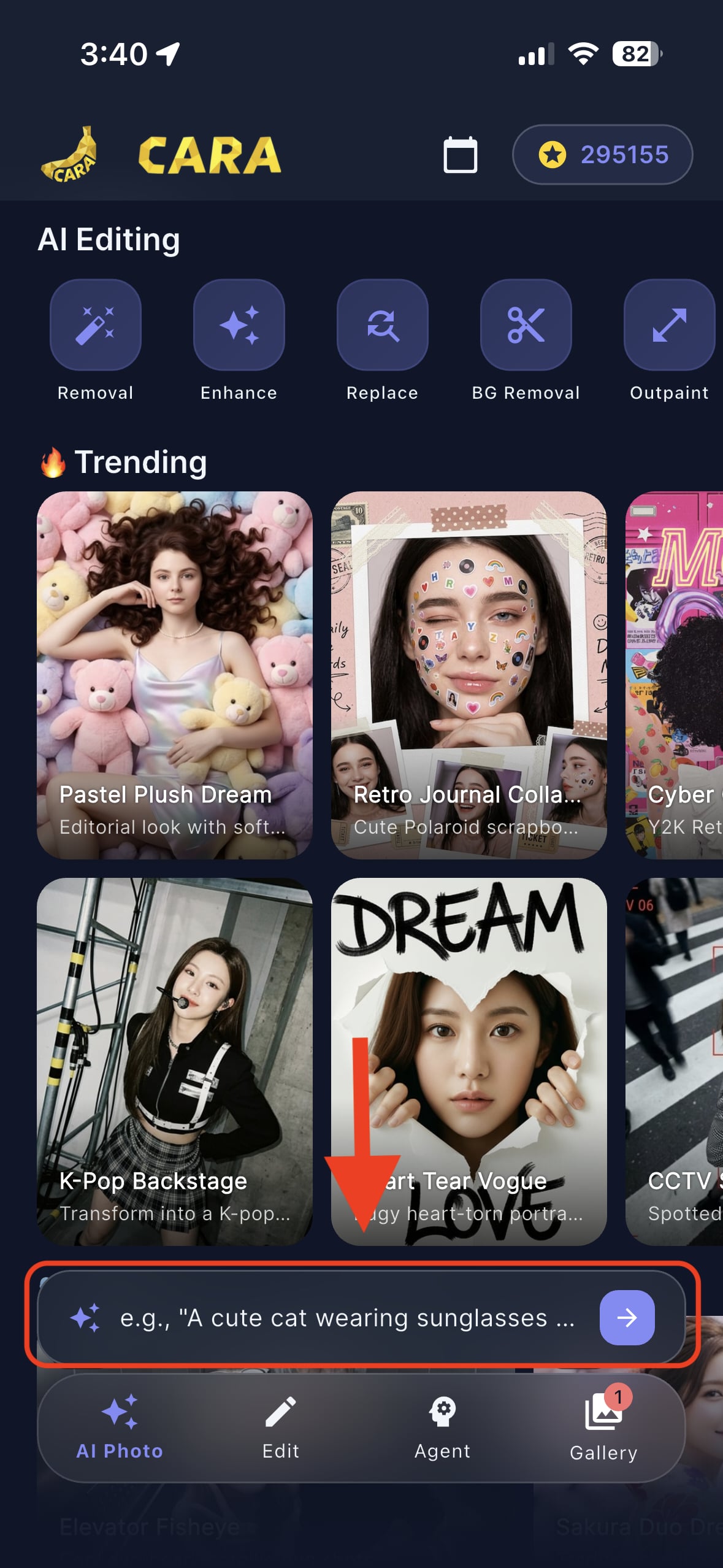
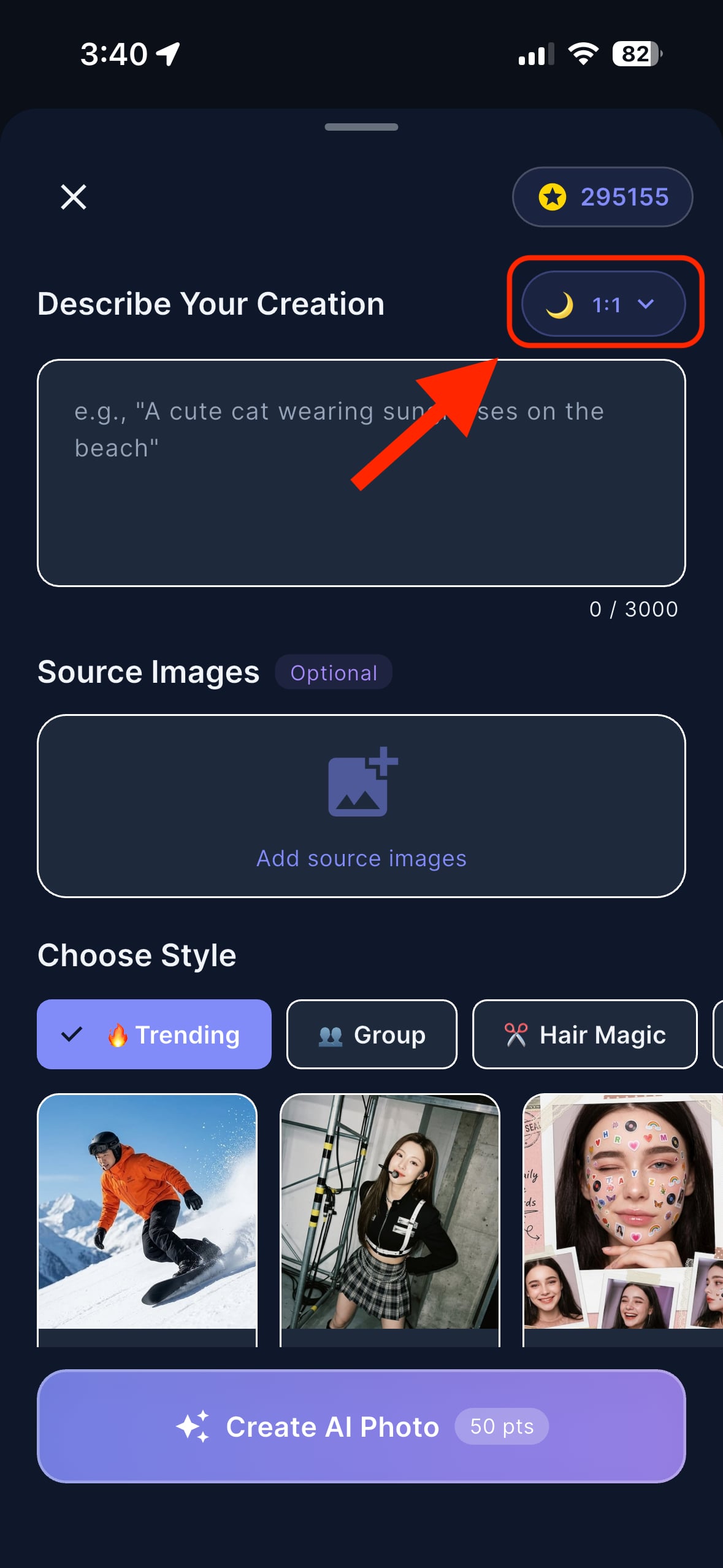
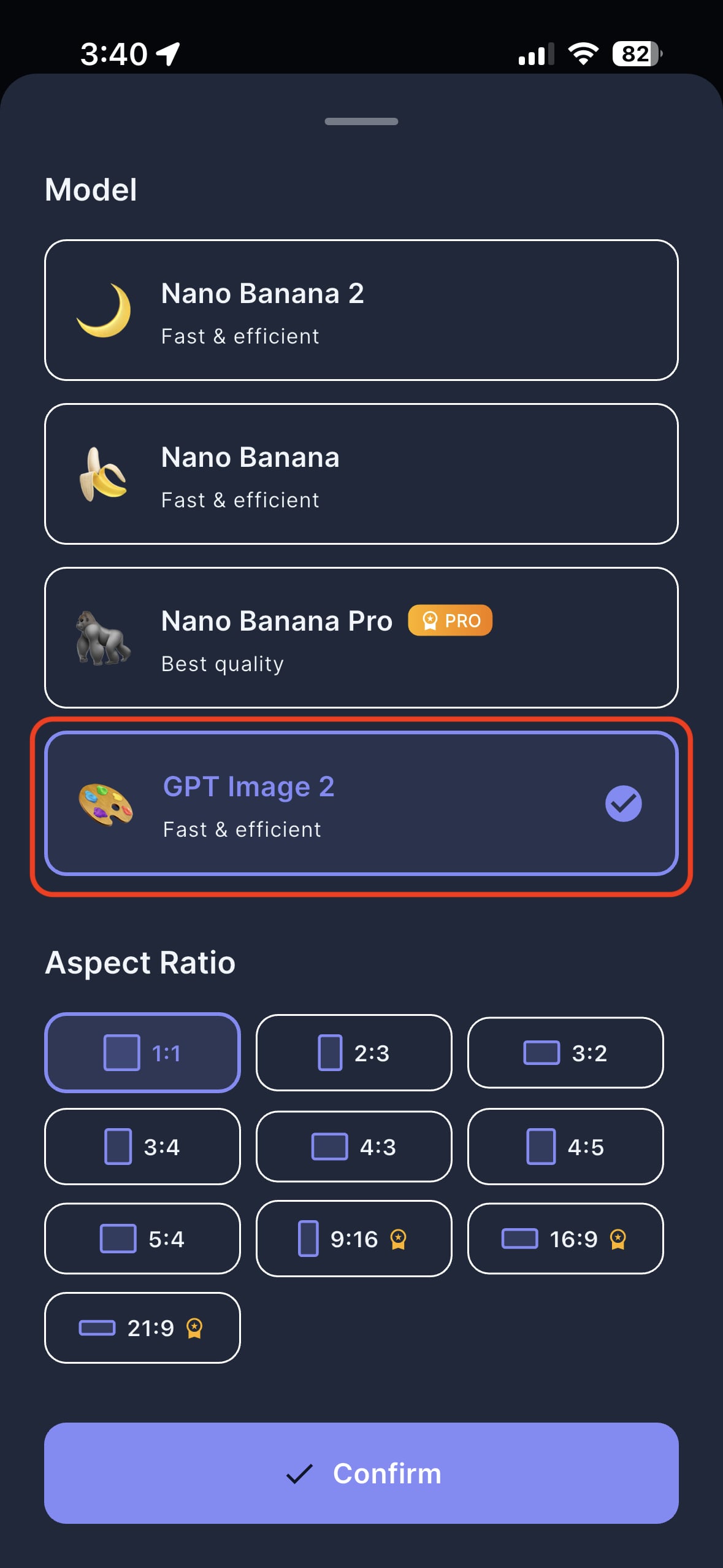
As shown in the images above, the selection process is integrated into the 'Describe Your Creation' flow. This allows you to toggle between different AI engines depending on the specific look or processing speed you desire for your next portrait.
Why You Should Switch to GPT Image 2
A comparative look at the advantages of this new engine.
The Analytical Edge
After extensive testing, our team has identified several key areas where GPT Image 2 outperforms previous iterations within the CARA ecosystem. For users who are frequent creators, these differences add up to a significantly better daily experience.
Pros of GPT Image 2
- Superior Texture Rendering: Skin textures and fabrics appear more realistic and less 'plastic' than in standard models.
- Balanced Resource Cost: Offers a middle ground between the free 'Nano' models and the high-cost 'Pro' models, providing great value for points.
- Improved Prompt Adherence: If you use the manual description bar, GPT Image 2 follows your instructions with much higher precision.
While models like 'Nano Banana Pro' offer ultimate quality, they often take longer to process and cost more credits. GPT Image 2 strikes the perfect balance for social media use, where speed and visual pop are the most critical factors. It is specifically tuned for the portrait-style templates that make CARA famous, ensuring that your selfies are transformed into usable, shareable content instantly.
Step-by-Step Setup
How to start generating with GPT Image 2 right now.
Ready to try it yourself? Follow these simple steps to ensure you're using the most advanced engine for your next AI photo session.
Open the Prompt Bar
On the CARA home screen, tap the AI prompt bar at the bottom or select a trending template to begin.
Access Model Settings
In the 'Describe Your Creation' screen, look for the model icon (usually a moon or banana) in the top right corner.
Select GPT Image 2
Scroll through the available models and tap on 'GPT Image 2'. You will see a checkmark confirming your selection.
Choose Aspect Ratio
Select your preferred output format (1:1, 9:16, etc.) and hit 'Confirm' to save your settings.
Pro Tip: You can also use this direct link to open the app with GPT Image 2 pre-selected: cara://ai-photo/model/4
Is This Right for You?
Mapping the GPT Image 2 model to different user needs.
Matching Models to Creators
CARA is designed for everyone, but different models serve different purposes. Here is how GPT Image 2 fits into various user profiles:
📸 The Social Influencer
Perfect for those who need high-frequency, high-quality content that looks professional but generates in seconds.
🎨 The Digital Artist
Ideal for users who want to explore different artistic templates without the wait times of pro-grade rendering.
✨ The Casual User
Best for people who want the 'best possible look' for their profile picture without diving into complex settings.
If you find that the basic models aren't quite capturing the detail you want, but you aren't ready to spend the extra points for the Gorilla 'Pro' model, GPT Image 2 is your sweet spot. It provides a noticeable jump in aesthetic quality that makes your photos stand out on a crowded social media feed.
Maximize Your Results
Getting the most out of the new GPT Image 2 integration.
Optimizing Your AI Experience
While the AI does the heavy lifting, a few simple choices can help GPT Image 2 deliver even better results. Since this model is more sensitive to detail, your input matters.
Lighting Matters: Even though the AI transforms your photo, uploading a source image with clear, even lighting helps the GPT Image 2 model map your facial features with much higher accuracy.
Stick to the Style: GPT Image 2 is highly optimized for CARA's curated templates. For the best results, pick a trending template like 'Cyber' or 'Retro Journal' and let the model enhance those specific aesthetics.
Remember that CARA is a template-based system. You don't need to learn how to write complex code or prompts; just find a style you love, ensure GPT Image 2 is selected, and let the cloud processing handle the rest.
Frequently Asked Questions
Everything you need to know about GPT Image 2 in CARA.
Is GPT Image 2 free to use?
Accessing the model depends on your current points balance. While the app is free to download, generating images with advanced models typically uses the app's points system.
Does this model work on Android?
No, CARA is currently an iOS-only application available for iPhone and iPad on the App Store.
Can I edit the photos after they are generated?
CARA does not include manual editing tools like brushes or sliders. The focus is on instant, high-quality AI generation based on templates.
What is the best aspect ratio for Instagram?
For posts, we recommend 4:5 or 1:1. For Stories, 9:16 is the perfect fit. GPT Image 2 supports all of these formats.
How long does generation take with GPT Image 2?
Typically, images are processed in under 15-20 seconds, though this can vary slightly based on server load and your internet connection.
Will my photos be saved automatically?
Once generated, you can choose to save the images to your camera roll or share them directly. The app keeps a gallery of your recent creations for easy access.
Ready to Transform Your Selfies?
Download CARA on the App Store today and start creating with the new GPT Image 2 model. Zero skills required, infinite possibilities.
Get CARA for iOS