 Scan to Download
Edit Photos via ChatSwap Ads with CARA AI
Witness the power of Google's Nano Banana Pro. Just tell the CARA AI Agent what to change, and watch the magic happen in real-time.
The Future of Photo Editing is a Conversation
No more complex tools—just tell the AI what you want.
Meet Your New Creative Sidekick
Have you ever looked at a photo and thought, "This would be perfect if only that one detail was different"? Traditional photo editing software requires hours of learning, layers, masking, and steady hands. But with the CARA app, photo editing has evolved into something far more intuitive. Using the revolutionary AI Agent feature, powered by Google's Nano Banana Pro, you can now modify your images by simply talking to them.
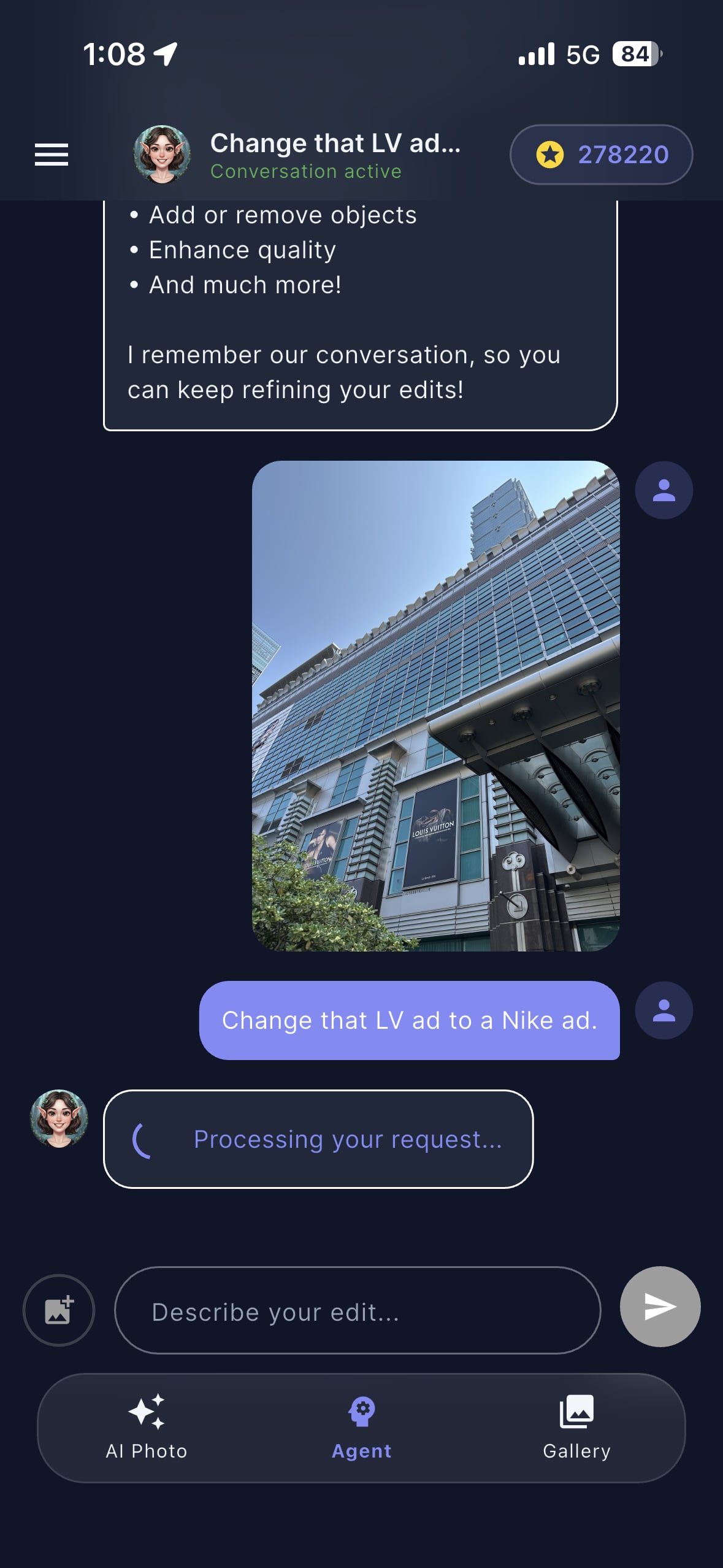
In this article, we're exploring a mind-blowing example: taking a high-angle shot of the iconic Taipei 101 mall and swapping a luxury Louis Vuitton advertisement for a classic Nike "Just Do It" billboard. This isn't just a simple sticker overlay; it's a deep AI integration that respects perspective, lighting, and texture. Whether you are a social media enthusiast or just someone who loves playing with technology, CARA makes high-end creative work accessible to everyone with an iPhone.
Did you know? CARA is built exclusively for iOS, utilizing the latest cloud-based AI to ensure your edits are processed in seconds without draining your battery.
From Luxury to Sportswear
See the stunning transformation of the Taipei 101 facade.
The Power of Context-Aware Editing
The beauty of CARA's AI Agent lies in its ability to understand context. When you ask to change a specific advertisement, the AI doesn't just cut and paste. It analyzes the surrounding architecture, the glass reflections of the skyscraper, and the angle of the original billboard. In our example, the transformation from a Louis Vuitton ad to a Nike ad is seamless.
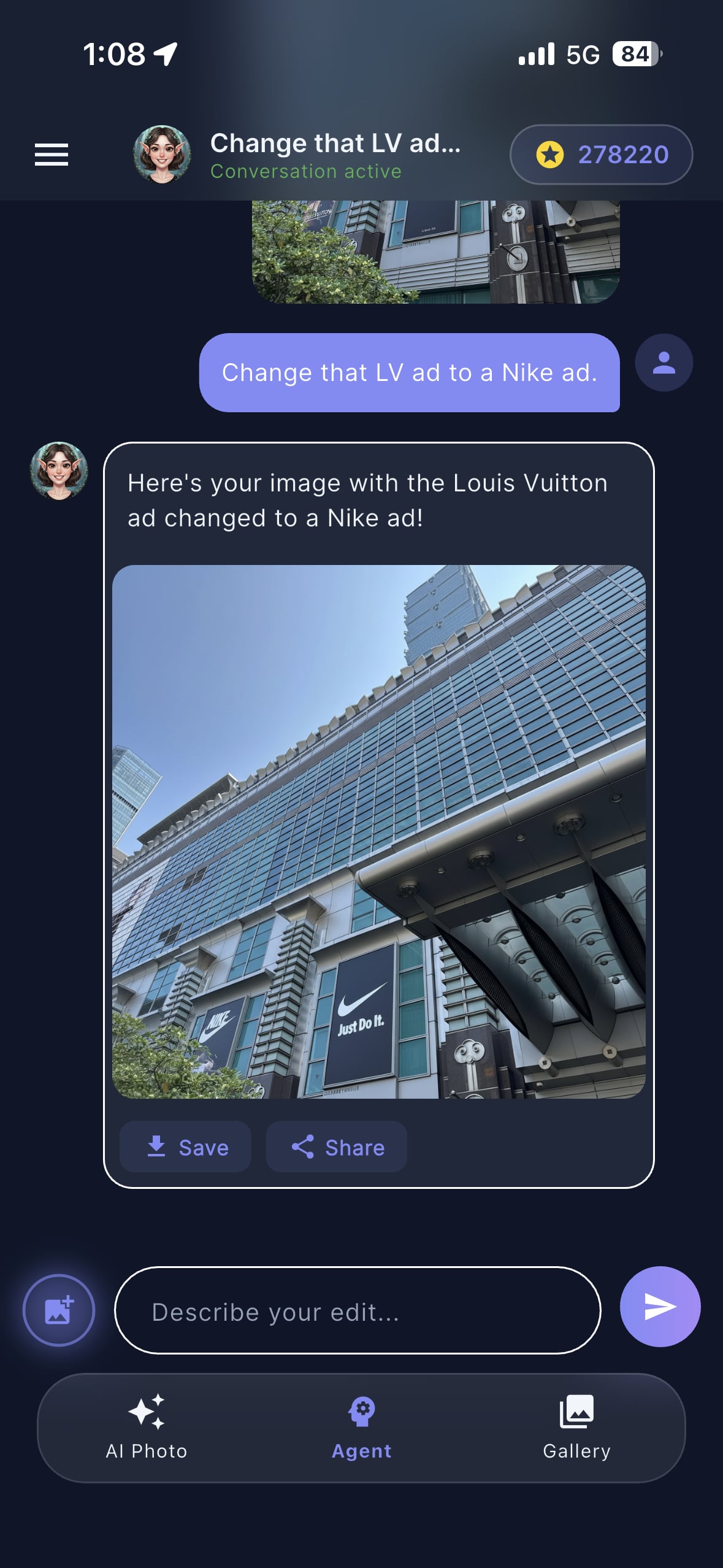
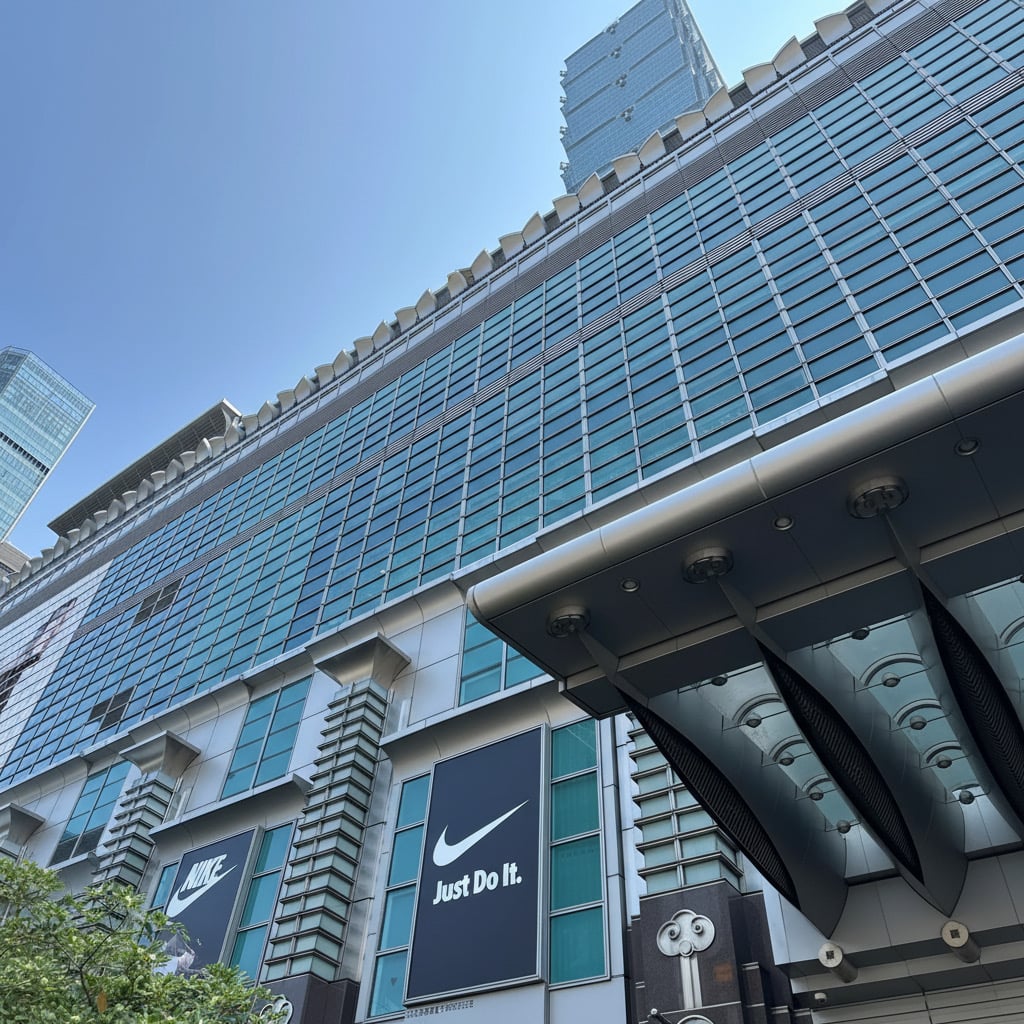
Notice how the Nike logo retains the exact perspective of the building's wall. The "Just Do It" text is perfectly aligned, and the black background of the ad blends naturally with the metallic frames of the mall entrance. This level of precision is what sets CARA apart from basic filter apps. It’s professional-grade manipulation achieved through a simple chat bubble.
How to Use the AI Agent
Follow these simple steps to transform your own photos.
Step-by-Step Magic
Ready to try it yourself? The process is designed to be completely frictionless. You don't need to know what 'opacity' or 'blending modes' are. You just need to know what you want to see. Here is how you can perform a similar edit using the CARA app on your iPhone.
Upload Your Photo
Open the CARA app and select the AI Agent tab. Upload a clear photo of a building, a room, or even a portrait where you want to change an object.
Type Your Command
In the chat box, simply type what you want to change. For example: "Change that LV ad to a Nike ad" or "Add a cat to the sofa."
Let the AI Process
Wait a few seconds while Google's Nano Banana Pro engine analyzes your request and regenerates the specific area of the image.
Save and Share
Once you're happy with the result, hit the save button to export the high-quality JPG to your camera roll or share it directly to Instagram.
It really is that simple. The AI Agent remembers your conversation, so if you want to make further refinements—like "Make the Nike logo bigger"—you can just keep typing until it's perfect.
Why CARA is Your Best Choice
State-of-the-art technology wrapped in a user-friendly package.
Advanced AI, Simplified
CARA isn't just about changing ads; it's a full-featured AI portrait and object generation tool. By focusing on a template-based and chat-based workflow, it removes the steep learning curve of traditional editors. Here are the core features that make CARA a must-have for every iPhone user.
✨ Nano Banana Pro
Powered by the latest Google AI models for unmatched realism and prompt accuracy.
💬 Chat-Based Editing
The only tool you need is your voice or your keyboard. No sliders, no brushes, no hassle.
🎨 Template Library
Choose from hundreds of styles for instant AI portraits—from vintage to futuristic fashion.
⚡ Cloud Speed
Complex edits that used to take hours are now handled in the cloud in under 10 seconds.
Whether you're looking to enhance the quality of a selfie or perform complex object replacement like our 101 billboard swap, CARA delivers consistent, high-quality results every time. It’s specifically optimized for the iOS ecosystem, ensuring a smooth and responsive experience on both iPhone and iPad.
Pro Tips for Best Results
Get the most out of the CARA AI Agent with these tricks.
Mastering the Prompt
While the AI is incredibly smart, providing clear context can help you get exactly what you're looking for on the first try. Here are a few ways to ensure your billboard swaps and object additions look flawless.
- Be Specific: Instead of saying "change the ad," say "change the Louis Vuitton billboard to a Nike advertisement with the slogan Just Do It."
- Lighting Matters: Try to use photos with consistent lighting. The AI is great at matching shadows, but clear source images yield the best blending.
- Perspective is Key: Wide-angle shots of buildings (like our Taipei 101 example) work wonderfully because they give the AI plenty of architectural cues to follow.
Pro Tip: You can use the AI Agent to remove distracting background objects too! Just tell it: "Remove the trash can on the left," and watch it disappear.
Frequently Asked Questions
Everything you need to know about CARA.
Is CARA available on Android?
No, CARA is exclusively designed for iOS. You can download it from the App Store for your iPhone or iPad.
Does it cost money to use the AI Agent?
CARA is free to download and includes a limited number of free generations. For frequent users, we offer a credit-based system that can be topped up via in-app purchases.
Can I edit videos with CARA?
Currently, CARA focuses on high-quality static image generation and AI editing. Video features are not supported at this time.
Are my photos private?
We take privacy seriously. Your photos are processed securely in the cloud to generate your results and are subject to our strict data protection policies.
Can I add text to my photos?
The AI Agent can generate text as part of an image (like the Nike logo), but there are no manual text overlay tools or typography settings in the app.
What AI model does CARA use?
CARA utilizes Google's Nano Banana 2 and Nano Banana Pro models to ensure the highest quality and fastest processing speeds for our users.
Experience the Magic Today
Ready to transform your photos with simple conversation? Download CARA now and start creating stunning AI edits in seconds.
Download CARA on App Store