
 Scan to Download
Master Your Baby's Wardrobe With AI Weather Recommendations
Say goodbye to outfit stress. Coordinate your baby's closet with real-time weather data and see how they look before getting dressed.
The Daily 'What Should They Wear?' Dilemma
Weather changes and toddler tantrums make dressing a challenge.
Why Dressing Babies is Surprisingly Hard
Every parent knows the morning routine: checking the weather app, looking at a pile of baby clothes, and trying to guess if that long-sleeve onesie will be too warm by noon. Babies can't tell us if they are chilly or overheating, making the "layered look" essential but complicated to plan. Furthermore, trying to get a toddler to model different outfits to see what looks best is a recipe for a meltdown.
We often end up buying clothes that don't match anything else in the closet, or worse, we forget about that cute sweater buried at the bottom of the drawer. Without a visual system that links your actual inventory to the daily forecast, managing a baby's wardrobe becomes a disorganized, stressful chore that wastes both time and money.
Why Traditional Wardrobes Fail Parents
Physical closets are static, but babies and weather are dynamic.
🌡️ Weather Blindness
Parents often dress babies for the current temperature, ignoring the highs and lows of the day ahead.
🧸 Forgotten Inventory
Clothing items get lost in drawers, leading to repeat purchases and wasted outfits your baby outgrows.
😫 Fitting Fatigue
Physically trying on three different sets of clothes on an active baby is exhausting for everyone involved.
🧩 Lack of Coordination
Buying individual pieces without a way to visualize how they layer with existing items leads to mismatched styles.
The root cause isn't a lack of clothes; it's a lack of visibility and contextual planning. You need a system that knows what you own and what the sky looks like today.
Enter BabyFit: Your AI Fashion Assistant
Combining Gemini AI with real-time weather for the perfect fit.
A Smarter Way to Manage Luka's Wardrobe
BabyFit isn't just a digital closet; it's an intelligent recommendation engine. By integrating Apple Weather data directly into your virtual wardrobe, the app suggests the perfect layers based on the "feels like" temperature. Whether it's a sunny day in Taiwan or a chilly morning elsewhere, BabyFit selects from your uploaded items to create a cohesive, climate-appropriate look.
High-Tech Virtual Try-Ons
Beyond suggestions, BabyFit uses Google Gemini-powered AI to perform instant virtual try-ons. You simply upload a photo of your baby and a photo of the clothing. The AI realistically renders your child wearing the outfit, allowing you to see the final look without ever unzipping a single button. It's the ultimate tool for planning special occasion outfits or just ensuring the daily green onesie matches those beige leggings perfectly.
Privacy First: Your baby's photos are never stored on servers or used for AI training. Everything is processed securely so you can focus on the cuteness.
How to Sync Your Baby's Style
Get organized and weather-ready in four simple steps.
Digitalize Your Closet
Take quick photos of your baby's tops, bottoms, and accessories and upload them to the Wardrobe tab.
Check AI Recommendations
Open the app to see the "Layered Outfit" suggestion based on your local real-time weather and palette preferences.
Virtual Fitting
Use the "Try-On" feature to see how new items or coordinated sets look on a photo of your baby instantly.
Add iOS Widgets
Install the BabyFit widget on your home screen to see today's recommended outfit and weather notes at a glance.
Real-Time Recommendations in Action
See how the app organizes your wardrobe and suggests daily looks.
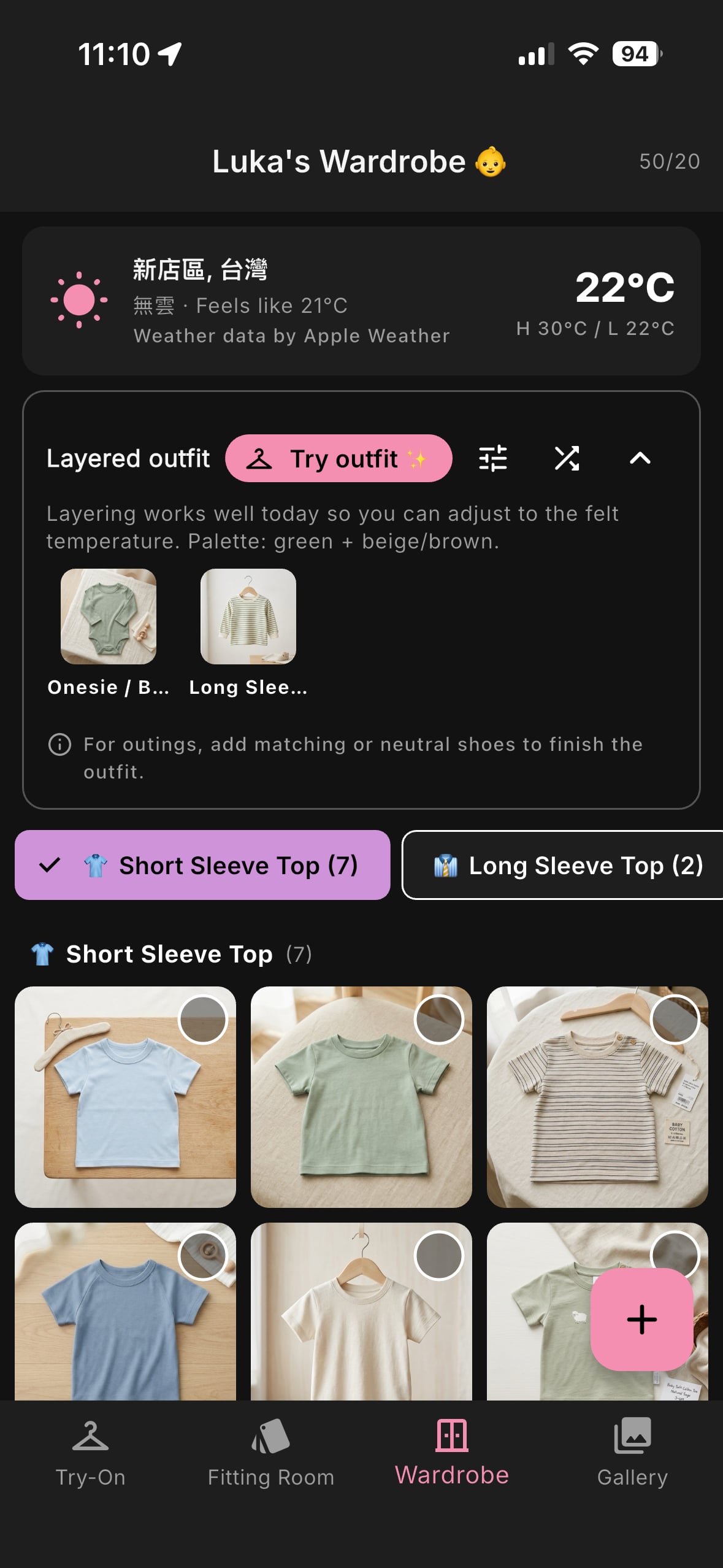
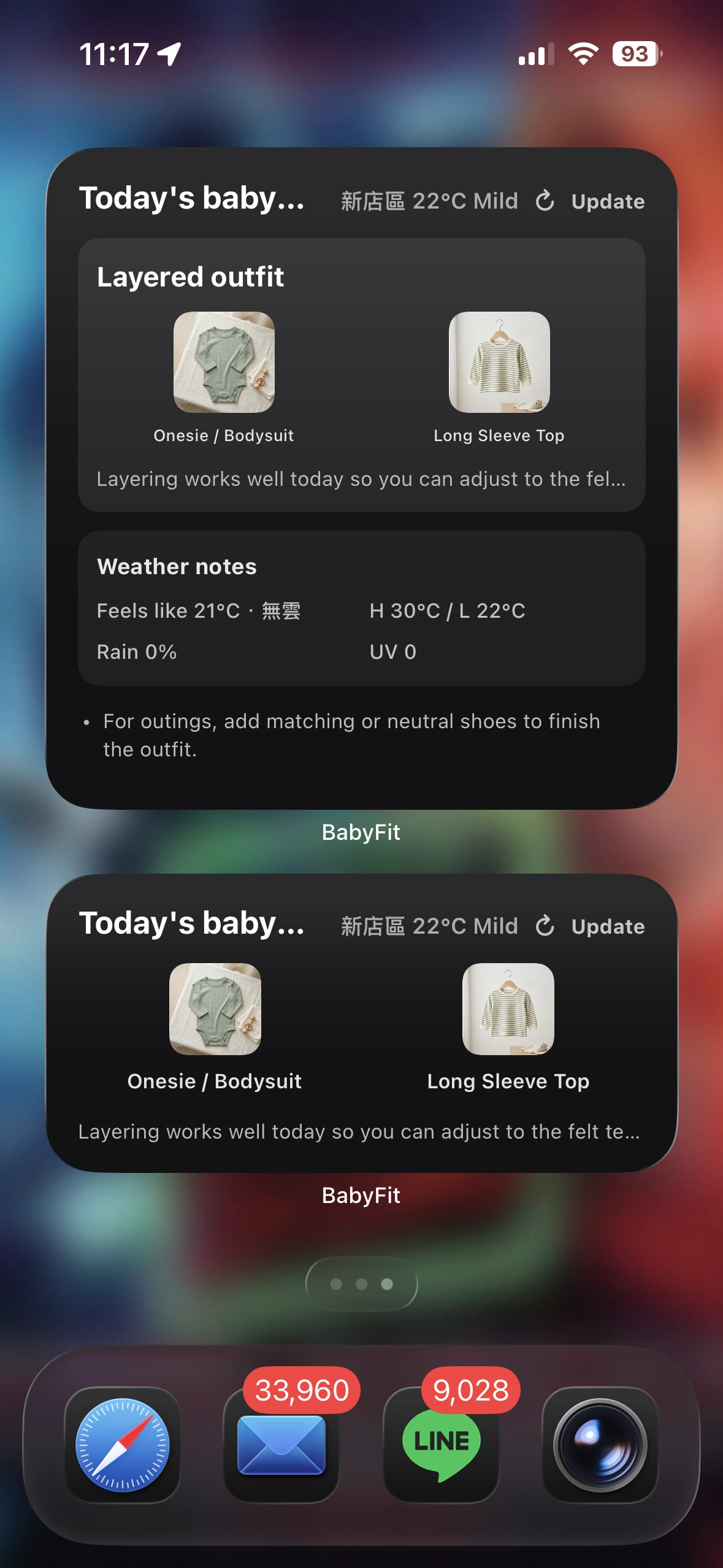
As shown above, the app provides a clear breakdown of the day's weather—including "feels like" temperatures and UV indexes—alongside a curated Layered Outfit. The home screen widgets keep this information accessible without even opening the app, ensuring you are always prepared for the day's outings.
Pro Tips for a Stress-Free Wardrobe
Maximize the value of your baby's clothing collection.
📸 Flat Lay Photos Work Best
When adding items to your wardrobe, photograph them on a neutral, flat surface in natural light. This helps the AI render the most realistic virtual try-on results.
🍂 Plan Layers by Palette
Use the app to group clothes by color palette (like green and beige). This makes layering easier and ensures your baby always looks coordinated.
📲 Use the Widget for Rapid Prep
Place the BabyFit widget right next to your weather app. It turns data into an actionable dressing plan in seconds.
Common Questions About BabyFit
Everything you need to know about our AI fitting room.
Is BabyFit really free?
Yes! The app is free to download and use. We use a credit-based system for virtual try-on generations, with free options available.
Does the app work for toddlers?
Absolutely. While we call it BabyFit, the AI works perfectly for infants, babies, and toddlers alike.
How does the weather recommendation work?
The app uses Apple Weather data based on your location to suggest appropriate layering (e.g., short sleeve vs. long sleeve + jacket).
Is my baby's photo safe?
We prioritize privacy. Photos are processed for the virtual fitting and are not used for AI training or stored permanently on our servers.
Can I see multiple items at once?
Yes, the Complete Outfit Creator allows you to combine tops, bottoms, and accessories into one single coordinated preview.
Is there an Android version?
Currently, BabyFit is exclusively available for iOS (iPhone and iPad) via the App Store.
Try the AI Fitting Room Today
Join thousands of parents who have simplified their morning routine. Download BabyFit for iOS and see how easy dressing your baby can be.
Download BabyFit on App Store