 Scan to Download
Your SelfieAs a Masterpiece
Skip the complex editing. Pick a template, upload your photo, and let CARA's advanced AI do the rest in seconds.
A New Era of Digital Art
No brushes required, just your imagination.
Beyond Traditional Photo Editing
In the past, creating a stylized portrait required hours of work in complex software or hiring a professional illustrator. Whether you wanted a Cubist interpretation like Picasso or a delicate Japanese woodblock print, the barrier to entry was high. CARA changes everything by putting professional-grade AI art tools directly into your pocket. Designed specifically for iPhone users, CARA focuses on the joy of creation rather than the frustration of technical sliders.
By leveraging Google's Nano Banana 2 technology, CARA interprets your facial features and merges them seamlessly with iconic artistic styles. It’s not just a filter that sits on top of your photo; it’s a total re-imagining of your image. From vibrant pop art to whimsical 3D miniatures, the app offers a curated library of templates that are updated regularly to keep your social media feed looking fresh and unique.
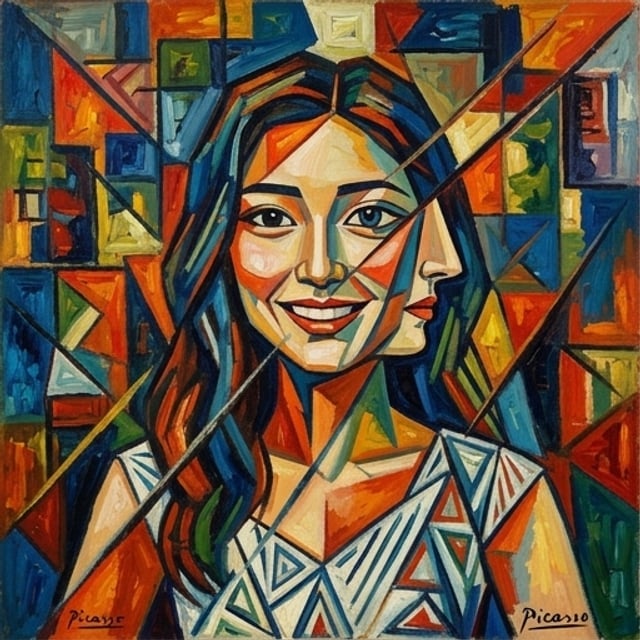
CARA is built for speed and simplicity. There are no manual brushes or complicated settings. If you can tap a screen, you can create a masterpiece.
Explore the Styles
Five distinct looks, one powerful app.
Our template library covers a vast spectrum of artistic history and modern trends. Whether you're feeling bold and abstract or sweet and animated, there's a template waiting for you. Here are some of our community's favorite results generated using the latest version of CARA.




As you can see, the AI maintains your recognizable features while completely transforming the medium, lighting, and background to match the chosen aesthetic. It's the perfect way to create a profile picture that stands out from the crowd.
Create Art in 3 Steps
The simplest workflow on the App Store.
From Selfie to Soulful Art
CARA was designed with a "result-first" philosophy. We removed all the clutter found in typical photo editors to give you a streamlined experience. You don't need to know about layers, saturation, or contrast—the AI handles all the artistic decisions.
Pick Your Style
Browse our extensive library of templates. Choose from Cubism, Anime, Traditional Art, and more.
Upload a Selfie
Select a clear photo from your iPhone camera roll. For best results, use a well-lit front-facing photo.
Tap Generate
Wait just a few seconds as the cloud-based AI processes your image. Save or share instantly!
Powered by Innovation
Advanced tech made incredibly simple.
🚀 Nano Banana Pro
Utilizing the latest AI models for high-fidelity artistic rendering and facial recognition.
✨ One-Tap Magic
Zero manual editing. Our AI does 100% of the work so you don't have to worry about sliders.
🖼️ Diverse Library
From vintage oil paintings to modern 3D renders, our styles are curated for trending aesthetics.
☁️ Fast Cloud AI
Get your results in seconds without slowing down your iPhone, thanks to our powerful servers.
CARA is exclusively available for iOS, ensuring a smooth, native experience for iPhone and iPad users. With support for over 14 languages, creators around the globe can join the AI art revolution with ease.
Best Practices for Pro Results
How to get the perfect AI generation every time.
While our AI is highly capable, the quality of your input photo can make a significant difference in the final output. Here are some tips to ensure your AI portraits look stunning.
Lighting and Angle
Ensure your face is well-lit, preferably with natural light. Avoid heavy shadows or backlighting, as this can confuse the AI's facial mapping. A direct, eye-level gaze usually yields the most symmetrical and pleasing results, especially for styles like Ukiyo-e or Paper-cut art.
Pro Tip:
Avoid using photos with sunglasses, hats, or hands covering the face. The AI needs to see your features clearly to transform them accurately!
Frequently Asked Questions
Everything you need to know about CARA.
Is CARA available on Android?
Currently, CARA is an iOS-exclusive app available for iPhone and iPad users on the App Store.
Does it cost money to generate images?
CARA is free to download and includes limited free generations. You can purchase additional credits or points within the app for more generations.
Can I edit the photos manually?
No, CARA is designed for simplicity. It does not have manual brushes, sliders, or cropping tools—the AI generates the final result automatically.
How long does it take to generate a portrait?
Thanks to our cloud-based processing, most images are generated within just a few seconds depending on your internet connection.
What file formats can I save?
You can save your high-quality AI portraits directly to your camera roll as JPG or PNG images for easy sharing.
Are my photos private?
We take privacy seriously. Your uploaded selfies are used solely for the generation process and are processed securely via our cloud AI.
Ready to See Yourself as Art?
Download CARA on the App Store today and start creating stunning AI portraits in seconds. Your first few generations are on us!
Download CARA on iOS